openelab.de
 openelab.com












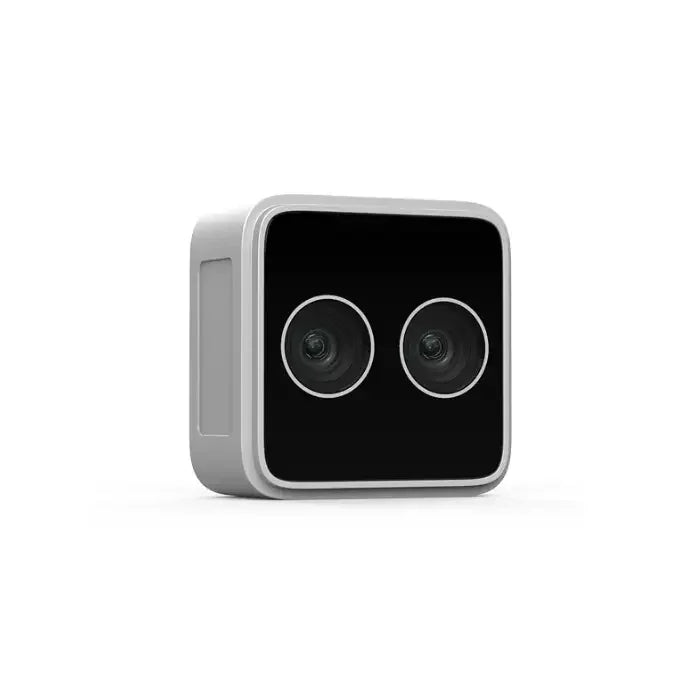


























The Orbbec Femto Bolt is a high-performance Time-of-Flight (ToF) depth camera designed for AI and robotics applications. It features a compact form factor with multi-mode depth sensing and RGB cameras connected via USB-C. This camera leverages Microsoft's proven ToF technology and offers identical operating modes and performance to the discontinued Microsoft Azure Kinect, making it an attractive alternative for developers seeking a cost-effective solution without compromising on quality.
In this comprehensive review, we'll explore the technical specifications, real-world applications, SDK integration, and how the Femto Bolt compares to other depth cameras in the market. Whether you're a robotics engineer, AI developer, or technology enthusiast, this guide will help you understand why the Orbbec Femto Bolt has become a go-to choice for depth sensing applications.
What is the Orbbec Femto Bolt?
The Orbbec Femto Bolt is a professional-grade Time-of-Flight (ToF) depth camera that captures detailed 3D information about its environment. Developed by Orbbec, a leading manufacturer of 3D vision sensors, the Femto Bolt represents a significant advancement in depth sensing technology. It was designed in collaboration with Microsoft to provide a compatible alternative to the Azure Kinect, offering nearly identical performance characteristics at a more accessible price point.
At its core, the Femto Bolt uses infrared light (850nm wavelength) to measure the time it takes for light to travel to objects and reflect back to the sensor. This enables real-time depth measurement without the need for complex baseline setups required by stereo vision systems. The camera can capture depth data at resolutions up to 1024×1024 pixels with a wide 120° field of view, while simultaneously providing 4K RGB color imaging at 3840×2160 resolution.
The device connects via USB 3.2 Type-C, carrying both power and data through a single cable. This simplifies integration into existing systems and reduces cable clutter in deployment scenarios. The camera also includes a 6-axis IMU (Inertial Measurement Unit) for motion tracking, making it suitable for dynamic applications where camera movement needs to be accounted for in the sensing data.
One of the most compelling aspects of the Femto Bolt is its software compatibility with the Azure Kinect ecosystem. Through Orbbec's K4A Wrapper, developers can use the Azure Kinect Sensor SDK directly with the Femto Bolt, enabling seamless migration for existing projects and access to the extensive body of documentation, tutorials, and sample code developed for the Azure Kinect platform.
Key Features at a Glance
- 1-Megapixel ToF Sensor: Delivers depth resolution up to 1024×1024 pixels, providing detailed 3D environmental sensing
- 4K RGB Camera: Captures 8.3-megapixel color images at 3840×2160 resolution with HDR support
- Dual Depth Modes: Choose between WFOV (120° FOV, 15fps) for broad coverage or NFOV (30fps) for precision
- USB-C Connectivity: Single-cable solution for power and data via USB 3.2 Gen 1
- 6-DoF IMU: Built-in inertial measurement unit for motion tracking
- Multi-Camera Synchronization: 8-pin connector supports external triggering and master/slave configurations
- Azure Kinect SDK Compatible: Drop-in replacement via K4A Wrapper
Detailed Technical Specifications
Depth Sensor Specifications
The heart of the Femto Bolt is its 1-megapixel Time-of-Flight sensor, representing a significant advancement over earlier ToF cameras that typically used lower-resolution sensors. This higher resolution enables more detailed depth maps that capture fine environmental details essential for applications like object recognition and precise measurement.
| Parameter | WFOV Mode | NFOV Mode |
|---|---|---|
| Resolution | 1024×1024 | 640×576 |
| Frame Rate | Up to 15 fps | Up to 30 fps |
| Horizontal FOV | 120° | 75° |
| Vertical FOV | 120° | 65° |
| Maximum Range | 5.46m | 5.46m |
| Optimal Range | 0.25m - 5.46m | 0.4m - 5.46m |
The depth sensor uses 850nm infrared light, which is in the near-infrared spectrum. This wavelength was chosen because it's invisible to humans but detectable by the sensor, while also being relatively safe for continuous operation.
RGB Camera Specifications
| Parameter | Specification |
|---|---|
| Resolution | 3840×2160 (8.3 megapixels) |
| Frame Rate | Up to 30 fps |
| Horizontal FOV | 80° |
| Vertical FOV | 51° |
| Sensor Type | Global Shutter |
| HDR Support | Yes |
Accuracy Specifications
| Metric | Specification |
|---|---|
| Systematic Error (Accuracy) | < 11mm + 0.1% × distance |
| Random Error (Precision) | ≤ 17mm (σ) |
| Depth Resolution at 2m | ~13mm |
| Depth Resolution at 5m | ~16mm |
Physical and Electrical
| Parameter | Specification |
|---|---|
| Dimensions | 115mm × 40mm × 65mm |
| Weight | 335g |
| USB Interface | USB 3.2 Gen 1 Type-C |
| Power Consumption | 4.35W average, 7W peak |
| External Power | 12V DC @ 2A |
| Operating Temperature | 10°C - 25°C |
| Operating Humidity | 8% - 90% RH (non-condensing) |
How Time-of-Flight Technology Works
Fundamental Principles
Time-of-Flight (ToF) camera technology represents one of the most elegant approaches to 3D depth sensing. Unlike stereo vision systems that require two cameras and complex triangulation calculations, or structured light systems that project patterns and analyze deformations, ToF cameras measure depth directly by timing the travel of light particles.
The process begins when the camera's illumination unit emits a pulse of infrared light at a specific wavelength (850nm for the Femto Bolt). This infrared light travels through the air, strikes objects in the scene, and reflects back toward the camera. The camera's sensor then measures the precise time elapsed between light emission and detection.
Since the speed of light is a known constant (approximately 300,000 km/s), calculating distance becomes straightforward: distance equals (speed of light × time of flight) / 2. The division by 2 accounts for the light traveling to the object and back. This entire process occurs millions of times per second across the sensor's pixels, creating a dense depth map of the scene.
Application Domains
Robotics and Autonomous Systems
The robotics industry represents one of the largest application domains for the Orbbec Femto Bolt. The camera's combination of wide field of view, accurate depth sensing, and real-time performance makes it an excellent choice for various robotic applications.
Obstacle Detection and Avoidance: The Femto Bolt's 120° field of view in WFOV mode enables robots to detect obstacles across a wide swath of their environment.
Autonomous Navigation: In indoor environments, the Femto Bolt's capabilities support mapping, localization, and path planning.
Precision Manipulation: For robotic arms performing pick-and-place operations, the depth camera provides the 3D information needed for accurate object localization.
If you're exploring robotics applications, check out our guide on choosing the right depth camera for your robot.
Healthcare and Biomedical Applications
Healthcare applications leverage the Femto Bolt's ability to capture human movement in 3D without markers or wearables.
Body Movement Tracking: The camera can capture how people move through space, their posture while sitting or standing, and detect abnormal movements.
Skeleton Tracking: AI-driven human skeleton algorithms can extract key body points from depth data.
For more on depth sensing in healthcare, learn about how ToF cameras are transforming patient monitoring.
Media, Entertainment, and XR
Volumetric Video: Capture real-world scenes in 3D, enabling viewers to move around captured content from different angles.
Motion Capture: Depth cameras offer a more accessible alternative to expensive marker-based systems for gaming and virtual reality.
Explore our collection of RGB-D cameras for immersive experiences.
Logistics and Industrial Automation
Package Dimension Measurement: The Femto Bolt uses depth data to calculate the physical dimensions of packages automatically.
Warehouse Automation: Robots in warehouses depend on depth sensing for navigation, pallet detection, and inventory tracking.
Learn more about industrial automation with depth sensors.
SDK and Software Ecosystem
Orbbec SDK and K4A Wrapper
The software ecosystem surrounding the Femto Bolt is one of its strongest selling points, particularly the K4A Wrapper that enables Azure Kinect SDK compatibility.
The Orbbec SDK K4A Wrapper provides:
- Depth and RGB camera access
- Motion sensor access (gyroscope and accelerometer)
- Synchronized Depth-RGB streaming
- External device synchronization control
- Frame metadata access
- Device calibration data
Supported Platforms
| Platform | Version | Architecture |
|---|---|---|
| Windows | 10+ | x86, x64 |
| Linux | Ubuntu 18.04/20.04/22.04 | x64 |
| Linux ARM64 | Ubuntu | NVIDIA Jetson |
Framework Integrations
- OpenCV: Computer vision processing
- Point Cloud Library (PCL): 3D point cloud processing
- ROS/ROS2: Robotics integration
- Unity/Unreal Engine: Game development
- Azure Kinect Body Tracking SDK: Skeleton tracking
For developers looking to get started, the official Orbbec SDK documentation provides comprehensive guides and examples.
Comparison with Alternatives
Azure Kinect DK Comparison
| Feature | Azure Kinect | Femto Bolt |
|---|---|---|
| Weight | 440g | 335g |
| Power | 5.9W max | 4.35W avg |
| Depth Resolution | 1024×1024 | 1024×1024 |
| RGB Resolution | 3840×2160 | 3840×2160 |
| USB-C | Yes | Yes |
| SDK | Azure Kinect SDK | K4A Wrapper |
The Femto Bolt offers nearly identical performance to the Azure Kinect at a more accessible price point. For a detailed comparison, check out discussions on Reddit's robotics community about depth camera alternatives.
Browse our complete Orbbec camera collection to compare all available models.
Getting Started
Setup Steps
- Connect the camera to your computer via USB-C
- Download and install the Orbbec SDK
- Run the viewer application to verify operation
- Select appropriate depth mode for your application
Mode Selection Guide
Choose WFOV for: Large-area coverage, obstacle detection, navigation in open spaces
Choose NFOV for: Precision measurement, object recognition, body tracking
Frequently Asked Questions
What is the Orbbec Femto Bolt and what makes it special?
The Orbbec Femto Bolt is a professional-grade Time-of-Flight (ToF) depth camera designed for AI and robotics applications. What makes it special is its compatibility with the Microsoft Azure Kinect ecosystem—it's essentially a drop-in replacement that offers nearly identical performance at a more accessible price point. It combines a 1-megapixel depth sensor capable of 1024×1024 resolution with a 4K RGB camera, all in a compact 335g package connected via USB-C.
What are the main differences between WFOV and NFOV modes?
WFOV (Wide Field of View) mode provides 1024×1024 depth resolution at 15 fps with a 120°×120° field of view, ideal for large-area coverage and obstacle detection. NFOV (Narrow Field of View) mode offers 640×576 resolution at 30 fps with a 75°×65° field of view, better suited for precision measurements and close-range applications.
How accurate is the Femto Bolt's depth sensing?
The Femto Bolt has a systematic error (accuracy) of less than 11mm plus 0.1% of the measured distance, meaning at 2 meters you can expect accuracy within about 13mm. Random error (precision) is ≤17mm standard deviation.
Can I use Azure Kinect software with the Femto Bolt?
Yes, through Orbbec's K4A Wrapper, you can use the Azure Kinect Sensor SDK directly with the Femto Bolt. This enables seamless migration for existing Azure Kinect projects and access to the Azure Kinect Body Tracking SDK.
What are the power requirements for the Femto Bolt?
The Femto Bolt operates at 4.35W average power consumption via USB 3.2 Type-C. For continuous operation or multi-camera setups, you can use an external 12V DC power supply (2A) through the 8-pin connector.
What platforms and frameworks support the Femto Bolt?
The Femto Bolt supports Windows 10+, Linux (Ubuntu 18.04/20.04/22.04), and Linux ARM64 (NVIDIA Jetson series popular frameworks including OpenCV, PCL,). It integrates with ROS/ROS2, Unity, Unreal Engine, and the Azure Kinect SDK through the K4A Wrapper.
What are the primary applications for the Femto Bolt?
The Femto Bolt is used across robotics (obstacle detection, navigation, object manipulation), healthcare (body tracking, posture monitoring, rehabilitation), media and entertainment (volumetric video, motion capture, AR/XR), and logistics (dimensioning, warehouse automation, quality control).
How does the Femto Bolt compare to the Azure Kinect?
The Femto Bolt offers nearly identical depth sensing performance to the Azure Kinect using the same ToF technology. It consumes less power (4.35W vs 5.9W), weighs less (335g vs 440g), and maintains software compatibility through the K4A Wrapper.
Conclusion
The Orbbec Femto Bolt represents an excellent choice for developers, researchers, and engineers seeking professional-grade depth sensing capabilities without the premium price tag or availability concerns of the discontinued Azure Kinect. Its combination of high-resolution depth sensing, 4K RGB imaging, USB-C connectivity, and Azure Kinect SDK compatibility creates a compelling package suitable for diverse applications.
The camera excels in robotics for obstacle detection and autonomous navigation, in healthcare for non-intrusive body tracking and monitoring, in media for volumetric capture and immersive experiences, and in logistics for automation and dimensioning. The robust SDK support across Windows, Linux, and embedded platforms ensures you can deploy the Femto Bolt in your preferred development environment.
With active software support from Orbbec and a growing ecosystem of integrations, the Femto Bolt provides a future-proof investment for your depth sensing needs.
Related Products:
- Orbbec Femto Mega - Advanced ToF with PoE
- Orbbec Gemini 2 - Compact stereo depth camera
Related Articles:
Author: OpenELAB Team
Category: 3D Vision Sensors
Tags: Orbbec, Time of Flight, ToF Camera, Depth Camera, RGB-D, Azure Kinect Alternative, Robotics, AI Vision, 3D Sensing