
 openelab.de
 openelab.com








































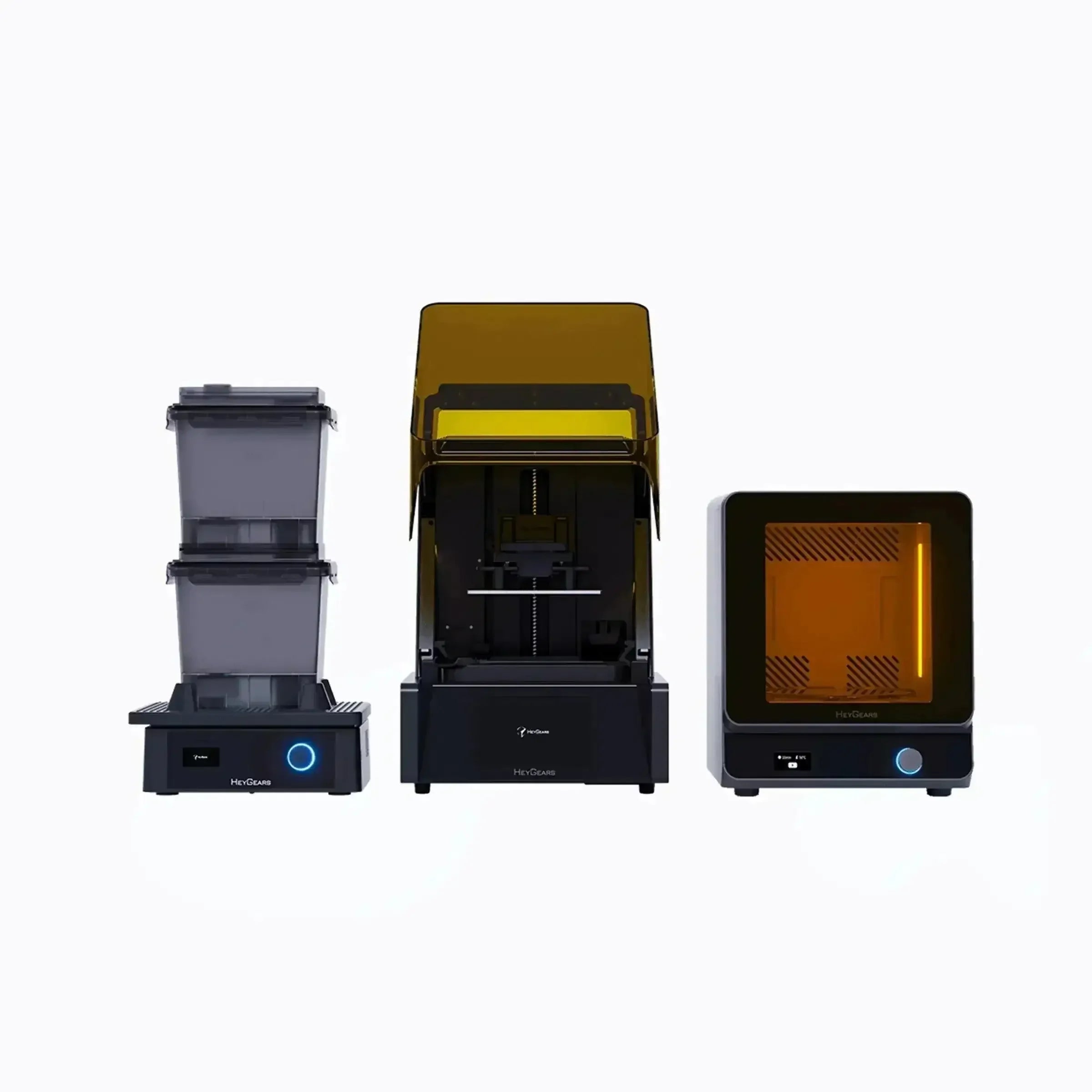


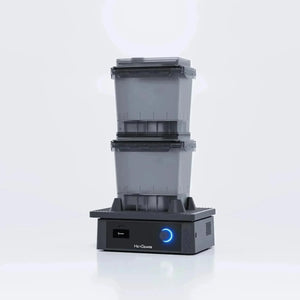
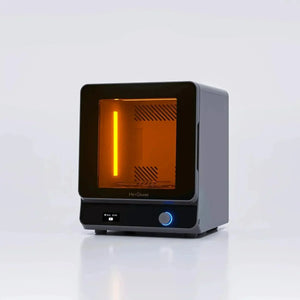
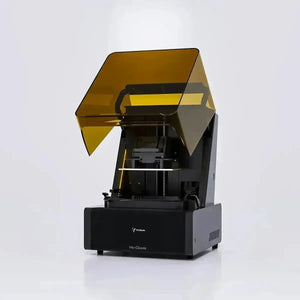
HeyGears UltraCraft Reflex 6K Resin 3D Printer Combo with Wash & Cure
Shipping from China within 5–10 working days
- During check out, you can choose direct shipping from China, or let us import the order to our EU/US office first and ship it to you locally.
- Import customs clearance and VAT are fully handled by us.
Need a larger quantity?
Need bulk pricing?
Get a formal quotation with lead time and volume pricing.
For universities, companies, distributors, and project orders.
HeyGears UltraCraft Reflex 6K Resin 3D Printer Combo with Wash & Cure
From Digital Model to Washed and Cured Part
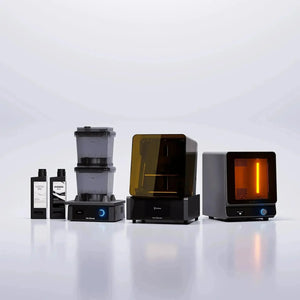
The HeyGears UltraCraft Reflex Combo combines the original Reflex MSLA resin printer, UltraCraft Wash and UltraCraft Cure. It brings model preparation, printing and post-processing into a coordinated workflow for detailed miniatures, display models and design prototypes. This is the original Reflex, not the Reflex RS or Reflex 2.
What the Combo Includes
| Equipment | Role in Your Workflow |
|---|---|
| 1 x UltraCraft Reflex | Prints successive resin layers using a masked UV light source. |
| 1 x UltraCraft Wash | Removes uncured resin from printed parts using a controlled washing cycle. |
| 1 x UltraCraft Cure | Post-cures washed parts using UV light and material-specific settings. |
This listing is the standard three-machine combo. A Pulsing Release Module and promotional resin bundles are not specified as included. Plan separately for printing resin, compatible cleaning liquid and ongoing protective supplies.
Printer Accessories and First-Use Supplies
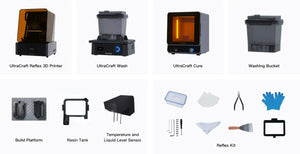
The manufacturer lists the Reflex printer with its resin tank and build platform, power cord, spare release film and LCD screen tape. Its standard accessory overview also lists film screws, gloves, Allen keys, a part-removal tool, scrapers, pliers, a small cleaning box, filter papers, a residue remover and multifunctional handle.
This is a manufacturer accessory reference, not a stock-specific counted packing slip: published manual revisions differ on some tools and film assemblies. The three machines are the core combo; do not assume promotional resin, an air purifier or a Pulsing Release Module from a photograph. For first use, prepare the chosen resin, its prescribed cleaning liquid, suitable gloves/eye protection, and a protected area for draining and drying parts.
Detail, Motion and Exposure Control
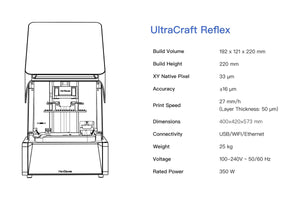
The 6K monochrome screen has 5760 x 3600 pixels with a native XY pixel size of 33 microns. The COB light source uses a 385+ nm optical system; the manufacturer specifies at least 94% light uniformity. An industrial ball-screw Z axis and perforated steel build platform support repeatable layer movement and part adhesion.
Three-dimensional anti-aliasing addresses both layer images and the Z direction to soften visible stepping. WDR fusion+ applies exposure compensation, while PICK recognition treats model regions and supports differently to balance surface quality with support removal. These are print-processing features, not a guarantee that every geometry will print without preparation.
Resolution is not the same as finished-part accuracy. XY pixel size describes the projected grid; layer thickness describes the vertical slice interval. Resin, orientation, support placement, washing and curing also affect fit and surface finish.
Layer Separation and Long-Term Print Control
Each newly cured layer must separate from the release film while remaining attached to its supports and the build platform. Real-time peeling-force management adjusts separation layer by layer to reduce dropping, breakage and visible layering. This built-in print strategy is distinct from the optional pneumatic Pulsing Release Module; the presence of one does not establish that the other is supplied.
Light-source compensation addresses another source of variation: the light source changes with use. Reflex compensates intensity over its operating life rather than relying on an unchanged initial exposure condition. This supports repeatability but does not eliminate material and geometry effects.
Release-film monitoring counts printed layers and prompts replacement. Status monitoring also flags detected errors. Use these prompts alongside a physical check for damage or cured debris; a counter cannot certify an undamaged film.
Automation That Reduces Repetitive Setup
- Build-plate leveling: the floating-screen arrangement compensates for small platform misalignment, with manufacturer-stated limits of 0.15 degrees and 240 microns.
- Resin management: level detection and automatic replenishment operate before and during printing; the stated resin measurement accuracy is +/-5 g.
- Heated tray: the manufacturer illustrates heating resin from 10 to 22 degrees Celsius in approximately 20 minutes. Actual warm-up depends on starting conditions.
- Residue detection: force sensing is specified at 0.1 N sensitivity, with detection of residue down to 0.2 mm and automatic stopping when a problem is detected.
These functions reduce manual intervention but do not replace inspecting the tank, preparing the model or checking a failed print before restarting.
Printer Specifications
| Parameter | Original UltraCraft Reflex |
|---|---|
| Printing process | LCD / MSLA photopolymer resin printing |
| Build volume | 191 x 121 x 220 mm, current official Combo specification |
| Screen / native XY pixel | 6K monochrome / 33 microns |
| Layer thickness | 50 microns listed on the Combo page; use available material-profile settings |
| Manufacturer-stated accuracy | +/-16 microns; not an unconditional tolerance for every printed part |
| Optical wavelength | 385+ nm |
| Printer dimensions / weight | 400 x 420 x 572 mm / 25 kg; printer only, not total combo shipping weight |
| Printer power | 100-240 V AC, 50/60 Hz; rated 350 W |
| Printer connections | USB drive, Wi-Fi and Ethernet |
UltraCraft Wash: Clean Before Final Curing
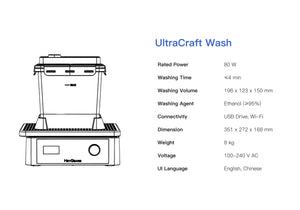
Vibration-based washing removes liquid resin from the model surface. The system can use a coordinated job with washing time and speed matched to the process, and supports custom settings. Its quoted washing envelope is 198 x 123 x 150 mm; a part that fits the printer does not automatically fit the washing box in the same orientation.
The Reflex-workflow specification lists ethanol of at least 95% concentration and typical washing cycles of 2-4 minutes. Treat this as a process example rather than a universal time for every resin or geometry. Follow the selected resin's cleaning instructions and check delicate parts, cavities and trapped liquid.
The Wash measures 351 x 272 x 168 mm, is rated at 80 W and supports USB drive and Wi-Fi. Its covered washing boxes help reduce direct handling of contaminated liquid; gloves and careful handling are still required.
UltraCraft Cure: Finish the Material, Not Just the Surface
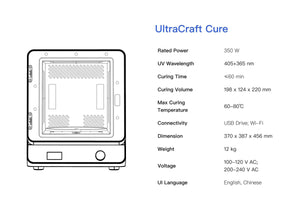
The Cure uses 365 nm and 405 nm UV wavelengths, with heating available for appropriate processes. Fast and performance curing modes serve different material objectives; select the resin's recommended cycle instead of applying one time and temperature to every print.
Its curing envelope is 198 x 124 x 220 mm, and its external dimensions are 370 x 387 x 456 mm. The manufacturer's specification lists a 350 W rating, USB drive/Wi-Fi connectivity and a 12 kg machine weight. Check the supplied unit's voltage label, particularly when planning an installation across regions.
Final strength and dimensional behavior depend on the complete material process. A part that feels dry after washing is not necessarily fully post-cured.
Prepare, Print, Wash and Cure
- Select the printer, resin and actual accessories in Blueprint Studio. Match original Reflex, the exact material/color and the tank configuration. Do not choose an RS/Reflex 2 profile or a pulsing-tank process for an unmodified standard setup.
- Prepare the model rather than importing a finished assumption. Set orientation and scale; use hollowing and drainage holes where appropriate. Generate layout and supports, then inspect thin details, unsupported islands and internal supports that cannot be removed.
- Check the plate and job before printing. Confirm resin identity and tank condition. Slice and review the job, then send it through the supported connection. The slicer's estimate relates to that job, not to all models that fit the build volume.
- Rough-wash, then fine-wash. Use the resin's settings and separate dirty bulk-removal liquid from the cleaner finishing wash. The washing boxes can be used sequentially rather than repeatedly contaminating the fine-wash liquid with the full resin load.
- Dry fully before curing. Let the model air-dry or use suitable clean air as the resin guide permits. Residual washing liquid can produce cloudy areas or uneven finish. Drain enclosed areas, not just the visible outer surface.
- Remove supports at the material-appropriate stage. For many miniatures, washing and drying before support removal, followed by final curing, makes cleanup easier. Use flush cutters at fragile contacts rather than twisting thin fingers, weapons or other details. Do not sand uncured resin.
- Run the matching Cure process. Select the specified time, medium and heating mode. After curing, trim or sand remaining marks and proceed to paint or clear-coat finishing where needed.
Choose Resin by the Part You Need
Choose the material first, then check the required hardware. The official compatibility matrix lists the following materials for original Reflex/Reflex Turbo. Optional pulsing support means the module is not mandatory for that material; it does not mean a module is included in this combo.
| Application and Materials | Selection and Hardware Boundary |
|---|---|
| General models: PAS10; rapid prototypes: PARP10 | For everyday shapes and prototype iterations. Pulsing module optional. |
| Detailed models: PAP10 | For fine-feature figures and presentation parts. Pulsing module optional; ash-grey and black have different published wash sequences. |
| ABS-like modeling: PAU10 / PAU11 | For an ABS-like resin workflow rather than printing thermoplastic ABS. Pulsing module optional. |
| Transparent models: PAT10; CMYK modeling: PAM10 | Pulsing module optional. PAT10 clarity can require finishing. PAM10 involves material color mixing, not automatic full-color inkjet printing. |
| Heat-resistant molding: PAH10; wear-resistant parts: PAWR10; flexible production: PAF10 | Pulsing module optional. Material-specific curing determines the finished properties; these are not properties of every Reflex print. |
| Water-washable models: PAWW10 / PAWW20 | The matrix marks pulsing-module use as No. Follow the water-wash process rather than substituting the alcohol workflow. |
| PAC10, PAU20, PAH270, PAE10 and PAE20 | Pulsing Release Module required in the official matrix. These are not ready-to-use standard-combo configurations; additional compatible hardware and the matching process are necessary. |
The current matrix and material-specific processing guides are available in the Reflex material compatibility table and material guide library. Match the exact material and color to the process package available for your printer in Blueprint Studio.
How Material Choice Changes Post-Processing
The examples below reproduce the choices in the manufacturer's material overview in condensed form. Wash times are rough wash + fine wash; they are not one combined bath. Use the exact resin's current application guide for speed, curing medium and detailed settings.
| Material / Color | Published Process Reference |
|---|---|
| PAS10 pale purple | IPA 1 + 2 minutes; cure 5 minutes. |
| PAS10 black / white | IPA 2 + 2 minutes; cure 10 minutes. |
| PAP10 ash grey / black | IPA 1 + 1 minutes for ash grey; 2 + 2 for black. Cure 30 minutes. |
| PAU10 / PAU11 | IPA 2 + 2 minutes; cure 30 minutes. |
| PAT10 transparent | IPA 2 + 2 minutes; cure 7 minutes. |
| PAH10 tan / black | IPA 1 + 1 minutes; cure at 60 degrees Celsius for 60 minutes. |
This is why a generic promise of a four-minute wash or one universal curing cycle is misleading. Color, formulation and the selected process affect the work required after printing. The material overview's IPA examples also differ from the Wash hardware page's ethanol example; use the cleaning agent specified for the selected resin and equipment, not an interchangeable solvent assumption.
Transparent and Painted Parts Need Finishing Too
The transparent-model workflow includes sanding and cleaning, with clear-coat finishing where required. Support contact marks influence the final appearance, so orient important visible surfaces away from support contacts where the geometry permits. Abrasives, coatings and application tools are separate workshop supplies, not part of a promise that every fresh PAT10 print will look like polished glass.
Workspace and Maintenance
Allow space for three machines, safe part transfer and access to covers, tanks and washing boxes. The printer's dimensions are not the footprint of the complete work area. Use a stable surface, suitable ventilation and protective equipment specified by the resin and cleaning-liquid safety instructions.
Check the release film for damage, leakage and cured residue; keep the optical surface and platform clean. A contaminated tank or damaged film can interfere with light transmission and first-layer adhesion. Inspect promptly after a failed print and replace worn consumables using the correct original-Reflex procedure.
FAQ
Can I use third-party resin and freely edit exposure settings?
Do not assume that capability for the original Reflex. HeyGears' published Print Process Editor guidance currently names Reflex RS and Reflex RS Turbo as supported models. Confirm support for the exact printer, software version and resin before buying materials outside the validated workflow.
Why buy a combo instead of only the printer?
Resin printing requires cleaning and post-curing after the print finishes. This combo supplies dedicated equipment for all three stages, instead of leaving you to source separate washing and curing machines.
Can a 220 mm-tall print be washed and cured unchanged?
Check every stage's capacity. The Wash's quoted height is 150 mm, while the printer and Cure list 220 mm. Part orientation, supports and the washing-box arrangement must be considered before printing a large object.
Where are software and operating guides available?
Use the Blueprint Studio software guide for downloads, account setup, device binding and slicing. The HeyGears support library provides original Reflex, Wash and Cure quick-start documents. Choose original Reflex instructions, not those for RS or Reflex 2.
Does the printer make full-color parts?
No automatic full-color printing is specified for this Reflex. A colored or CMYK-mixed resin supplies the material color; multi-color presentation can involve separate prints, assembly or painting. Do not confuse this printer with HeyGears G1-series color printing.
Is a Pulsing Release Module necessary for every print?
No. The material selection table separates optional, required and unused pulsing configurations. Start with materials approved for the standard setup; budget for the compatible module and tank when your chosen material requires them.
What is the printing speed?
A single speed figure cannot establish the completion time for your model. Height, layer setting, material and separation strategy affect the job. Use the sliced-job estimate; a taller supported model or different material process may take longer even when the footprint is unchanged. No RS Turbo or Reflex 2 speed claim is applied to this original Reflex.
1. General Shipping Information
- We provide reliable shipping services with a tracking number for each order.
- Shipping addresses must be entered in English and should not contain special symbols, so that the courier system can recognize your location correctly.
- Please make sure your shipping address is accurate before placing your order. We ship strictly according to the address provided at checkout.
- In-stock orders are usually dispatched within 1 business day after order confirmation.
- Estimated delivery times refer to the period after dispatch and do not include order processing time, weekends, public holidays, customs inspection, or force majeure delays.
- If you need to cancel or modify your order, please contact us before the order is marked as “Shipped”. Once shipped, the order cannot be canceled or changed.
🚀 Need Faster Shipping?
If you require expedited shipping, please contact our customer support team at info@openelab.io for a customized quote based on your destination.
2. Shipping Rates & Options
Shipping rates are calculated based on order value, destination, and available shipping methods. The final available options will be displayed at checkout.
2.1 Germany Domestic Shipping
| Shipping Method | Order Value | Cost | Est. Delivery |
|---|---|---|---|
| Deutsche Post | €0.00 - €50.00 | €4.95 | 2-4 Business Days |
| Deutsche Post | Over €50.00 | Free | 2-4 Business Days |
|
DHL Paket (Faster Delivery) |
€0.00 - €50.00 | €6.95 | 1-3 Business Days |
|
DHL Paket (Faster Delivery) |
€50.00 - €100.00 | €2.00 | 1-3 Business Days |
|
DHL Paket (Faster Delivery) |
Over €100.00 | Free | 1-3 Business Days |
2.2 Selected EU Countries / Regions
Available EU shipping destinations are shown at checkout based on your shipping address. For orders shipped to selected EU countries or regions outside Germany, we use FedEx Regional Economy.
| Shipping Method | Order Value | Cost | Est. Delivery |
|---|---|---|---|
| FedEx Regional Economy | €0.00 - €100.00 | €7.95 | 3-5 Business Days |
| FedEx Regional Economy | Over €100.00 | Free | 3-5 Business Days |
EU orders may be fulfilled from our Munich warehouse or, when applicable, from our Shenzhen warehouse depending on inventory availability. For EU member states, OpenELAB covers applicable import duties and taxes under DDP service where required.
2.3 United States
| Region | Shipping Method | Order Value | Cost | Est. Delivery |
|---|---|---|---|---|
|
Continental U.S. (50 States) |
USPS Ground Advantage | €0.00 - €45.00 | €4.95 | 3-7 Business Days |
| USPS Ground Advantage | Over €45.00 | Free | 3-7 Business Days | |
| USPS Priority Mail | €0.00 - €45.00 | €16.95 | 1-4 Business Days | |
| USPS Priority Mail | Over €45.00 | €14.95 | 1-4 Business Days | |
|
Non-Continental U.S. (AK, HI, PR, etc.) |
USPS Ground Advantage | €0.00 - €60.00 | €6.95 | 5-9 Business Days |
| USPS Ground Advantage | Over €60.00 | Free | 5-9 Business Days |
Non-Continental U.S. regions include Alaska, American Samoa, Guam, Hawaii, the Marshall Islands, the Northern Mariana Islands, Palau, Puerto Rico, the U.S. Virgin Islands, and U.S. Armed Forces addresses.
2.4 International Destinations Outside the EU
For selected international destinations outside the EU, including Switzerland, the United Kingdom, and Norway, shipping rates are as follows:
| Order Amount | Shipping Cost |
|---|---|
| €0.00 - €300.00 | €19.95 |
| Over €300.00 | Free |
For non-EU destinations, import duties, taxes, and customs fees may be charged by the destination country and are the responsibility of the recipient.
3. Warehouses & Fulfillment
Our products may be stored in our Munich, Arlington, and Shenzhen warehouses. The actual shipping warehouse depends on product availability and destination.
3.1 Munich Warehouse
For products stored in our Munich warehouse, we use Deutsche Post or DHL Paket for domestic deliveries within Germany. For selected EU destinations outside Germany, we use FedEx Regional Economy.
3.2 Arlington Warehouse
For products stored in our Arlington warehouse, we use USPS or UPS for deliveries within the United States.
3.3 Shenzhen Warehouse
For pre-order items or products fulfilled directly from our Shenzhen warehouse, we arrange reliable international shipping based on destination and inventory status. For EU member states, OpenELAB covers applicable import duties and taxes under DDP service where required.
4. Inventory, Pre-orders & Split Shipments
- Inventory Status: Please check the product page for real-time stock information. If an item is out of stock in our local warehouses, it may be marked as “Pre-order”.
- Pre-order Fulfillment: Pre-order items may be shipped directly from Shenzhen or restocked to a local warehouse first before final delivery.
- Split Shipments: If your order contains both in-stock and pre-order items, we may ship them separately. No additional shipping fee will be charged for split shipments caused by our fulfillment arrangement.
5. Customs, Taxes & Delivery Issues
5.1 Customs and Taxes
For EU Member States:
Whether shipped from Germany or China, OpenELAB covers applicable import duties and taxes under DDP service where required. Customers in EU member states should not be charged additional import duties or VAT upon delivery.
For destinations outside the European Union, such as Switzerland, Norway, and the United Kingdom, import duties, taxes, and customs fees may be charged by local authorities upon delivery. These fees are the responsibility of the recipient.
5.2 Damaged, Delayed, or Lost Parcels
Please inspect your parcel upon delivery where possible. If you notice visible damage, please report it to the courier and contact us as soon as possible. This does not affect your statutory consumer rights.
If your parcel is delayed, lost, returned to sender, or the tracking information has not updated for an unusual period of time, please contact us at info@openelab.io. We will assist you in checking the shipment status with the courier.
5.3 Incorrect Address or Failed Delivery
If a parcel cannot be delivered due to an incorrect or incomplete address provided by the customer, refusal of delivery, or failure to collect the parcel, additional shipping or return costs may apply.
6. VAT
For orders within the EU, VAT is collected at checkout according to the applicable destination rules. No additional VAT should be collected upon delivery for EU member state orders covered under our DDP shipping arrangement.


