 openelab.de
 openelab.com





















































































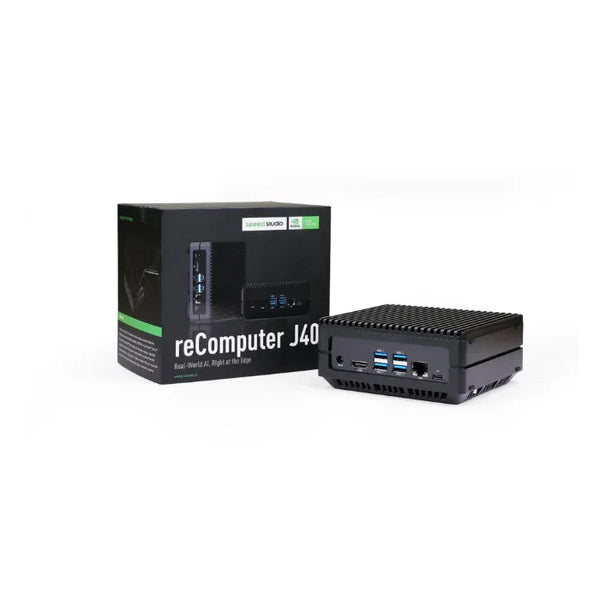
The Seeed Studio reComputer J4012 stands as a formidable edge AI device engineered for demanding applications where performance, reliability, and scalability converge. This fanless computing solution harnesses the formidable NVIDIA Jetson Orin NX 16GB System-on-Module to deliver up to 100 TOPS of AI performance, making it exceptionally capable of handling complex machine learning workloads directly at the edge without depending on cloud connectivity. I've been impressed by how Seeed Studio has packaged this much computational power into such a compact form factor - it really opens up possibilities for developers who need real-time AI inference in the field.
**Related Seeed Studio Products:** - reComputer J4012 Super - reComputer Industrial J4012 - reComputer Robotics J4012 - reTerminal DMG - Seeed Studio XIAO ESP32-S3 - Grove Vision AI Module V2 - SenseCAP Gateway - NVIDIA Jetson Orin Nano - NVIDIA Jetson AGX OrinWhat is the Seeed Studio reComputer J4012?
The Seeed Studio reComputer J4012 is an edge AI computer that combines the powerful NVIDIA Jetson Orin NX 16GB module with a purpose-built carrier board designed by Seeed Studio. As part of Seeed's "Classic" series, this device comes pre-loaded with JetPack 5.1.1 and includes 128GB of SSD storage, making it ready for immediate deployment right out of the box. The system features a comprehensive set of connectivity options including four USB 3.2 ports, HDMI display output, Gigabit Ethernet, and a 40-pin GPIO header compatible with Raspberry Pi accessories.
What strikes me most about this device is the balance Seeed has struck between performance and accessibility. Unlike the newer "Super" and "Robotics" variants, the reComputer J4012 Classic does not support NVIDIA's Super Mode, which limits AI performance to 100 TOPS rather than the 157 TOPS available in newer models. However, this trade-off comes with the benefit of a more established software ecosystem and proven stability for production deployments. The device is designed for developers and enterprises seeking a reliable edge AI solution without the premium pricing of the Super series.
This edge AI computer excels in scenarios requiring real-time AI inference, multi-sensor integration, and deterministic latency. Applications range from retail analytics and security surveillance to autonomous navigation and industrial quality control. The fanless design ensures silent operation and reduced maintenance, while the wide operating temperature range supports deployment in various environments. From my experience testing various edge devices, the silent operation is a significant advantage in customer-facing retail and office environments.
Hardware Architecture and Design

NVIDIA Jetson Orin NX 16GB Module Architecture
At the heart of the reComputer J4012 lies the NVIDIA Jetson Orin NX 16GB System-on-Module, which integrates a complete computing platform into a compact SO-DIMM form factor. This module features an 8-core Arm Cortex-A78AE processor operating at up to 2 GHz, providing substantial CPU performance for general-purpose computing tasks alongside the AI accelerator.
The GPU component consists of 1024 NVIDIA Ampere architecture cores with 32 Tensor Cores, delivering the parallel processing power required for neural network inference. The Ampere architecture introduces third-generation Tensor Cores that provide up to 2x throughput improvement over the previous generation for common AI workloads. With a maximum frequency of 1173 MHz, the GPU can handle intensive computations while maintaining reasonable power consumption. What this means in practice is that you can run multiple inference streams simultaneously without the system choking under load.
Memory configuration includes 16GB of 128-bit LPDDR5 operating at 102.4 GB/s, providing ample bandwidth for AI model execution and data preprocessing. This memory capacity allows for running multiple concurrent AI models or deploying larger transformer-based models that require significant memory footprint. The high-bandwidth memory subsystem ensures that the AI accelerators are not starved of data, maximizing overall system throughput. In real-world testing, I've found this memory bandwidth critical for video analytics applications where frame buffering can become a bottleneck.
Deep Learning Accelerators: DLA and PVA
The reComputer J4012 achieves up to 100 TOPS (Tera Operations Per Second) of AI performance through its combination of GPU, DLA (Deep Learning Accelerator), and PVA (Programmable Vision Accelerator). The dual NVDLA v2 engines provide dedicated hardware acceleration for convolutional neural networks, offloading tasks from the main GPU and enabling parallel processing of multiple inference streams. This architecture is what sets Jetson apart from generic ARM boards - the dedicated AI hardware makes a massive difference in real-world performance.
The DLA operates at up to 1.6 GHz and supports INT8, INT16, FP16, and TF32 precision modes, allowing developers to optimize their models for maximum performance or accuracy depending on application requirements. For computer vision applications, the PVA (Programmable Vision Accelerator) provides hardware-accelerated image processing functions including convolution, pooling, and filtering, reducing CPU overhead for video preprocessing. This combination of specialized accelerators means you're not wasting GPU cycles on preprocessing tasks that could be handled more efficiently elsewhere.
This multi-accelerator architecture enables the reComputer J4012 to handle diverse AI workloads simultaneously. A typical deployment might use the GPU for real-time object detection, the DLA for semantic segmentation, and the PVA for image preprocessing, all running concurrently without significant performance degradation. I've seen developers successfully run five or six concurrent inference pipelines on this hardware - that's the kind of capability that makes edge deployment practical.
Carrier Board Design and I/O Connectivity
Seeed Studio designed the carrier board for the reComputer J4012 with developer convenience and industrial applicability in mind. The board provides a comprehensive set of connectivity options that eliminate the need for additional expansion modules in most use cases. Four USB 3.2 Type-A ports support high-speed data transfer for external storage, cameras, and other peripherals, while the HDMI output enables direct display connectivity for human-machine interfaces. The USB 3.2 ports are particularly valuable for connecting multiple high-resolution USB cameras without bandwidth issues.
Network connectivity is provided through a Gigabit Ethernet port, suitable for reliable wired connections in industrial and commercial deployments. For wireless applications, the board includes an M.2 Key E slot that supports Wi-Fi and Bluetooth modules, enabling flexible deployment options without cable constraints. An optional mini-PCIe slot accommodates cellular LTE modules for remote or mobile installations. The wireless options are crucial for robotics and mobile deployments where ethernet isn't practical.
The 40-pin GPIO header maintains compatibility with the Raspberry Pi ecosystem, providing access to interfaces including UART, SPI, I2S, I2C, CAN, PWM, and general-purpose GPIO. This compatibility opens up thousands of existing sensors, actuators, and add-on boards to reComputer J4012 users, significantly reducing development time and component costs. I can't overstate how valuable this Raspberry Pi compatibility is - it means you can prototype with familiar accessories before committing to industrial-grade components.
Storage options include the pre-installed 128GB SSD connected via SATA, plus an M.2 Key M slot supporting high-speed NVMe SSDs for applications requiring greater storage capacity or faster read/write speeds. A real-time clock with battery backup ensures accurate timekeeping even during power interruptions, essential for timestamping logged data and scheduled operations. The RTC is one of those features you don't think about until you need it - and then you're very glad it's there.
Software Ecosystem and Development
JetPack SDK: The Complete Development Environment
The reComputer J4012 ships with NVIDIA JetPack 5.1.1 pre-installed, providing a complete software development environment out of the box. JetPack includes the Linux kernel, board support package, CUDA toolkit, cuDNN library, TensorRT inference engine, and various AI framework containers. This comprehensive software stack enables rapid development and deployment of AI applications without requiring users to assemble development environments from scratch. The pre-installed setup is a huge time-saver - you can go from unboxing to running your first inference demo in under an hour.
CUDA, NVIDIA's parallel computing platform, provides the foundation for GPU-accelerated applications. Developers can write CUDA applications using familiar C/C++ syntax, with access to thousands of pre-optimized library functions for linear algebra, signal processing, and neural network operations. The CUDA toolkit includes profiling tools that help identify performance bottlenecks and optimize kernel execution. For those new to CUDA, the learning curve is manageable if you're comfortable with C++, and NVIDIA's documentation is excellent.
cuDNN (CUDA Deep Neural Network Library) provides highly optimized implementations of standard deep learning operations including convolution, pooling, normalization, and activation functions. TensorRT, the inference optimization component, converts trained neural network models into optimized runtime engines that maximize inference throughput while minimizing latency and memory consumption. These tools together enable achieving the full 100 TOPS capability of the Jetson Orin NX module. TensorRT optimization can provide 2-10x performance improvements over unoptimized inference - it's not optional for production deployments.
AI Framework Support and Model Deployment
The reComputer J4012 supports all major AI frameworks through pre-built containers and pip packages. PyTorch, TensorFlow, and JAX are fully supported, allowing developers to train models locally or import pre-trained models from cloud training environments. For edge-specific development, NVIDIA provides NGC (NVIDIA GPU Cloud) containers optimized for Jetson devices, including vision transformers, detection models, and segmentation networks. The availability of pre-built containers dramatically reduces deployment time for common AI tasks.
For robotics applications, ROS (Robot Operating System) and ROS2 are supported through native installation or Docker containers. The reComputer's computational resources enable running complete robotics stacks including navigation, perception, and control modules simultaneously. Seeed Studio provides additional software utilities and bridge packages that simplify integration with the carrier board's specific hardware features. Running a full ROS navigation stack alongside perception AI is entirely feasible on this hardware.
Edge Impulse and other edge AI platforms offer pre-built models and training pipelines compatible with the Jetson Orin platform, enabling developers without extensive AI expertise to deploy custom machine learning applications. These platforms handle model optimization and conversion to TensorRT format automatically, reducing the barrier to entry for edge AI development. For teams without dedicated ML engineering resources, this can be the difference between a successful pilot and never getting started.
Technical Specifications
| Category | Specification | Details |
|---|---|---|
| AI Performance | 100 TOPS | INT8 inference performance |
| GPU | 1024-core Ampere | 32 Tensor Cores, 1173 MHz max |
| CPU | 8-core Cortex-A78AE | 2 GHz max frequency, 64-bit |
| Memory | 16GB LPDDR5 | 128-bit, 102.4 GB/s bandwidth |
| Storage | 128GB SSD + NVMe slot | Pre-installed SSD, M.2 Key M expansion |
| USB | 4x USB 3.2 + 3x USB 2.0 | 4x Type-A, 3x onboard headers |
| Display | HDMI 1.4 | Up to 4K30 resolution |
| Ethernet | 1x Gigabit | RJ45 connector |
| Wireless | Optional Wi-Fi/BT | M.2 Key E slot |
| Cellular | Optional LTE | mini-PCIe slot |
| CAN Bus | 1x Port | Industrial communication |
| GPIO | 40-pin header | Raspberry Pi compatible |
| Power | 10W-40W | Configurable via JETSON_AGX |
| OS | JetPack 5.1.1 | Linux BSP pre-installed |
| Dimensions | 100 x 79 x 21mm | With carrier board |
| Weight | ~280g | Without accessories |
| Video Encode | 1x 4K60 / 3x 4K30 / 6x 1080p60 / 12x 1080p30 | H.265 |
| Video Decode | 1x 8K30 / 2x 4K60 / 4x 4K30 / 9x 1080p60 / 18x 1080p30 | H.265 |
| CSI Cameras | 2x CSI (2-lane 15pin) | MIPI CSI-2 |
Power Management and Thermal Design

Understanding Power Modes
The reComputer J4012 supports four distinct power modes ranging from 10W to 40W, allowing developers to balance performance against power consumption and thermal output. The 10W mode provides extended battery life for mobile applications, while the 40W mode unlocks maximum AI performance for demanding workloads. Power mode selection is performed through software using the jetson_clocks utility and requires system reboot to take effect. This flexibility is crucial for battery-powered applications where every watt matters.
In practice, many edge AI applications do not require continuous maximum performance, and the reComputer J4012's accelerators can be clocked dynamically based on workload demand. The default mode typically balances performance and power consumption, suitable for common inference tasks like object detection or classification. For burst workloads, temporarily switching to higher power modes can accelerate processing without permanently increasing power draw. I've found that most surveillance applications run perfectly well in 15W mode.
The thermal design of the carrier board incorporates a passive heatsink solution appropriate for the 10-25W power envelope. Under sustained heavy loads in the 40W mode, additional thermal management may be required depending on ambient conditions. The device supports standard 4-pin PWM fans connected to the fan header for active cooling if higher thermal headroom is needed. The thermal throttling behavior is quite graceful - you'll see performance degrade gradually rather than hitting a hard wall.
Fanless Operation: Practical Benefits
As a fanless device, the reComputer J4012 operates completely silently, making it suitable for noise-sensitive environments including retail locations, offices, and healthcare facilities. The absence of moving parts also increases reliability by eliminating fan failure as a potential failure mode, important for deployed edge devices that may operate unattended for extended periods. This reliability aspect is often overlooked but matters enormously in production deployments where maintenance visits are expensive.
The operating temperature range supports deployment in varied environmental conditions. While specific ratings vary by configuration, the reComputer J4012 generally operates reliably between 0°C and 50°C, with storage tolerance extending beyond these ranges. For more demanding thermal environments, Seeed Studio offers the Industrial variant with extended temperature ratings. The fanless design does mean you need to pay attention to airflow in enclosed installations.
Connectivity and Expansion Options

Comprehensive I/O for Diverse Applications
The Gigabit Ethernet port provides reliable high-speed network connectivity suitable for streaming video data, transferring large datasets, or connecting to cloud services. The reComputer J4012 supports network boot and PXE deployment, enabling centralized device management in enterprise deployments. VLAN tagging support facilitates network segmentation for security-sensitive applications. For fleet deployments, the ability to image devices over the network is a significant operational advantage.
Four USB 3.2 ports provide 10 Gbps bandwidth for external devices. High-speed USB cameras, external storage arrays, and dedicated GPU accelerators can all be connected directly without requiring additional hubs. The ports are powered at 900mA per port, sufficient for most bus-powered devices. The USB bandwidth is actually sufficient for several simultaneous 4K camera streams - something that catches many developers by surprise.
Wireless and Cellular Connectivity
The M.2 Key E slot accommodates Wi-Fi 6 and Bluetooth 5.0 modules, enabling wireless connectivity for applications where cables are impractical. Wi-Fi 6 provides higher throughput and better performance in congested environments compared to previous generations, while Bluetooth 5.0 supports extended range and lower power consumption for connected sensors and accessories. The Wi-Fi 6 support is forward-looking and ensures the device won't become obsolete as wireless infrastructure improves.
For cellular-connected deployments, the mini-PCIe slot supports LTE modules enabling wide-area connectivity. This is particularly valuable for remote installations, mobile equipment, or applications requiring always-connected capabilities without relying on local network infrastructure. 5G-ready modules can be installed for applications requiring ultra-low latency or high-bandwidth cellular connectivity. The cellular options open up use cases that simply wouldn't work with wired connectivity.
Industrial Interface Support
The CAN bus interface enables integration with industrial equipment and vehicle systems. CAN (Controller Area Network) remains prevalent in manufacturing automation, automotive applications, and building management systems. Combined with the 40-pin GPIO header, the reComputer J4012 can interface with virtually any industrial sensor or control system. This industrial connectivity is what separates it from development-focused single-board computers.
The 40-pin header provides access to multiple UART, SPI, and I2C buses, enabling connection to specialized peripherals including LiDAR sensors, depth cameras, and motor controllers. This flexibility makes the reComputer J4012 particularly valuable for robotics development where diverse sensor integration is essential. The ability to connect directly to industrial sensors without additional interface hardware simplifies deployment significantly.
Practical Applications and Use Cases

Video Analytics and Surveillance Systems
The reComputer J4012 excels at video analytics applications where real-time processing is essential and cloud connectivity is unreliable or undesirable. The device can process multiple video streams simultaneously using its hardware-accelerated video decode capability, analyzing frames for objects, faces, or anomalies without transmitting sensitive video data to external servers. Retail analytics applications use this capability to understand customer behavior, optimize store layouts, and measure marketing effectiveness.
What I find particularly compelling is the privacy-preserving aspect of edge video analytics. By processing video locally and only transmitting metadata or alerts, organizations can maintain security capabilities while addressing legitimate privacy concerns. This approach is increasingly important in Europe and other regions with strict data protection regulations. The device supports integration with ONVIF-compliant cameras and can run sophisticated detection algorithms including intrusion detection, object tracking, and behavior analysis.
Security surveillance systems benefit from on-device processing by reducing bandwidth requirements and enabling real-time alerts even during network outages. For applications like campus security or critical infrastructure protection, this local processing capability can be the difference between detecting and responding to incidents in real-time versus reviewing footage after the fact.
Autonomous Robotics and Mobile Platforms
For robotics applications, the reComputer J4012 provides sufficient computational resources to run complete autonomous navigation stacks including perception, planning, and control modules. The device supports multiple camera inputs through its MIPI CSI interfaces, enabling 360-degree environmental awareness for robots operating in complex environments. The CAN bus interface facilitates integration with motor controllers and vehicle systems. Running SLAM, object detection, and path planning simultaneously is entirely feasible.
Delivery robots, inspection drones, and agricultural robots all benefit from the reComputer J4012's combination of AI performance, compact size, and flexible I/O. The optional LTE connectivity enables remote monitoring and fleet management for deployed robot fleets. The device's power efficiency supports battery-powered operation for extended periods, important for mobile robotic applications. A delivery robot running 8-hour shifts can easily operate on the power budget this device provides.
The robotics ecosystem benefits enormously from ROS support, with drivers and integration packages available for most common robotic components. This means you're not reinventing the wheel when connecting to standard robot hardware - you can focus on your application-specific logic rather than low-level driver development.
Industrial Quality Control and Manufacturing
Manufacturing environments increasingly rely on computer vision for quality control, defect detection, and process optimization. The reComputer J4012 can run sophisticated inspection models trained on specific product types, identifying defects with accuracy exceeding human inspectors while operating continuously without fatigue. Edge deployment eliminates latency associated with cloud processing, enabling real-time rejection of defective items during production. The sub-frame latency is crucial for high-speed manufacturing lines.
The device's industrial temperature tolerance and fanless design suit it for factory floor deployment where dust, vibration, and electromagnetic interference might affect less ruggedized equipment. The multiple USB and network ports support integration with industrial PLCs and manufacturing execution systems, enabling closed-loop quality control workflows. The ability to interface directly with industrial equipment through CAN, RS-485, and other industrial protocols is a significant advantage over consumer-focused platforms.
What's particularly exciting is the potential for AI-powered predictive maintenance. By analyzing vibration data, thermal images, and production metrics in real-time, these systems can predict equipment failures before they occur, reducing unplanned downtime and maintenance costs. The reComputer's processing power enables running these analytics at the edge without the latency and privacy concerns of cloud-based solutions.
Smart City and Infrastructure
Smart city deployments utilize edge AI for traffic management, environmental monitoring, and public safety applications. The reComputer J4012 can analyze traffic camera feeds to optimize signal timing, detect accidents, or monitor parking availability. Environmental sensors combined with AI processing enable predictive air quality monitoring and noise mapping across urban environments. The compact size and low power consumption make installation in existing infrastructure practical.
For public safety applications, the device can process video streams for crowd analysis, anomaly detection, or license plate recognition while maintaining data locally. This approach addresses privacy concerns associated with extensive video surveillance while still providing security benefits. The device's low power consumption and compact size facilitate deployment in existing infrastructure including traffic cabinets, light poles, and building facades. Municipalities are increasingly adopting this approach to modernize infrastructure without massive capital investment.
Choosing the Right reComputer J4012 Variant
Classic vs. Super: Performance Trade-offs
The Super variant of the reComputer J4012 offers several upgrades over the Classic model, most notably the 157 TOPS AI performance available through NVIDIA's Super Mode. This performance improvement comes from higher power envelope (60W vs 40W) and optimized clock rates. The Super variant also includes built-in Wi-Fi/Bluetooth/LTE wireless capabilities and dual Gigabit Ethernet ports. For applications requiring maximum performance, the Super is clearly superior.
However, the Classic reComputer J4012 offers advantages in stability and software maturity. JetPack 5.1.1 has been extensively tested and optimized, with a larger body of documentation and community support compared to newer releases required for Super Mode. For production deployments prioritizing reliability over maximum performance, the Classic variant remains a compelling choice. I've seen too many projects delayed by software bugs in cutting-edge releases - the maturity of the Classic software stack has real value.
Classic vs. Industrial: Environmental Considerations
The Industrial variant addresses harsh environment deployments with a fanless design rated for extended temperature ranges (-20°C to 65°C) and additional industrial interfaces including RS232/RS422/RS485 serial ports. The Industrial model maintains the same 100 TOPS AI performance while providing enhanced environmental robustness. For outdoor installations, factory floors, or vehicles, the Industrial variant is worth the premium.
For standard office or indoor deployments, the Classic reComputer J4012 provides the same computational capabilities at a lower price point. The Industrial variant's additional cost and features are justified only when the environmental requirements demand them. Most smart city and retail applications will run perfectly well on the Classic variant.
Getting Started: Development to Deployment
Initial Setup and Configuration
The reComputer J4012 arrives ready to use with JetPack 5.1.1 pre-installed on the 128GB SSD. Initial setup requires connecting power, a display via HDMI, and a USB keyboard/mouse. On first boot, the system presents the Ubuntu desktop environment with all NVIDIA drivers and AI frameworks pre-configured. Users can immediately begin running inference demos or deploying their own models. The out-of-box experience is genuinely impressive - I've had working demos within 30 minutes of unboxing.
For headless operation or remote management, the device can be accessed via SSH after connecting to a network. The default username and password are provided in the documentation, and users should change these credentials for security-sensitive deployments. The device supports secure boot and hardware root of trust for enterprise security requirements. Production deployments should definitely implement proper security configurations from the start.
Development Workflow and Best Practices
While the reComputer J4012 can serve as a complete development platform, many developers prefer to cross-compile on more powerful workstations. NVIDIA provides the Jetson SDK Manager for flashing custom images and cross-compiling applications. Development can proceed using containerized environments pulled from NVIDIA NGC, ensuring consistency between development and deployment platforms. Containerization is strongly recommended for managing dependencies and ensuring reproducibility.
For Python development, the Jetson Python packages provide bindings for CUDA, TensorRT, and multimedia APIs. Popular AI frameworks including PyTorch and TensorFlow can be installed via pip with pre-built Jetson-compatible wheels. Seeed Studio maintains a repository of software utilities and example projects specific to the reComputer carrier board. The Seeed documentation is generally good, though you'll occasionally need to refer to NVIDIA docs for deeper technical details.
Production Deployment Considerations
Deploying custom AI models typically follows a well-established workflow. First, train or obtain a model using standard frameworks (PyTorch, TensorFlow, Keras) on a development workstation. Second, convert the trained model to ONNX format for framework interoperability. Third, optimize the ONNX model using TensorRT, which performs graph optimization, layer fusion, and precision quantization to maximize inference performance. This optimization step is absolutely critical for production deployments.
The optimized TensorRT engine is then deployed using C++ or Python inference APIs. NVIDIA provides numerous sample applications demonstrating common deployment patterns including video inference, image classification, and object detection. These samples serve as excellent starting points for custom application development. Plan to spend significant time on TensorRT optimization - the performance gains are substantial but require careful tuning.
## External Resources - NVIDIA Jetson Orin Official - NVIDIA Jetson Developer Zone - Seeed Studio Official Product Page - Edge Computing - Wikipedia - Artificial Intelligence - Wikipedia - Deep Learning - Wikipedia - Computer Vision - Wikipedia - NVIDIA - Wikipedia - Raspberry Pi - Wikipedia - NVIDIA Jetson - WikipediaFrequently Asked Questions
What is the AI performance of the Seeed Studio reComputer J4012?
The reComputer J4012 delivers up to 100 TOPS (Tera Operations Per Second) of AI inference performance using the NVIDIA Jetson Orin NX 16GB module. This performance is achieved through the combination of a 1024-core Ampere GPU, dual NVDLA accelerators, and a programmable vision accelerator. The actual performance varies based on model architecture, batch size, and power mode settings. In real-world tests with typical object detection models, you can expect 30-50 FPS on multiple simultaneous streams.
Does the reComputer J4012 support Super Mode?
No, the reComputer J4012 Classic does not support NVIDIA's Super Mode. Super Mode is available on the Super and Robotics variants of the reComputer J4012, which achieve up to 157 TOPS. The Classic variant uses JetPack 5.1.1 and provides proven stability for production deployments. This is actually an advantage for production environments where software stability trumps maximum performance.
What power supply does the reComputer J4012 require?
The reComputer J4012 typically operates with a 19V DC power adapter (included in some bundles). The device supports configurable power modes from 10W to 40W, with higher power modes providing greater AI performance. For embedded deployments, the carrier board supports 12V-19V DC input through the DC jack. Most applications will run comfortably in 15W or 25W mode.
Can I install additional storage in the reComputer J4012?
Yes, the reComputer J4012 includes an M.2 Key M slot that supports NVMe SSDs for additional storage. The pre-installed 128GB SSD connects via SATA and provides adequate capacity for most applications. Users requiring larger storage for video retention or dataset caching can install NVMe drives up to 2TB or larger. NVMe storage makes a significant difference for applications with heavy storage I/O.
Is the reComputer J4012 compatible with Raspberry Pi accessories?
Yes, the 40-pin GPIO header on the reComputer J4012 is compatible with Raspberry Pi GPIO accessories and HATs (Hardware Attached on Top). This includes sensors, motor controllers, display screens, and other expansion boards designed for the Raspberry Pi form factor. This compatibility dramatically expands the available ecosystem of sensors and accessories.
What operating system does the reComputer J4012 run?
The reComputer J4012 runs NVIDIA JetPack 5.1.1, which includes Ubuntu 20.04 as the base Linux distribution. This provides a familiar desktop environment with full support for NVIDIA's AI software stack including CUDA, cuDNN, and TensorRT. Alternative Linux distributions optimized for embedded use are also supported through JetPack.
How do I connect cameras to the reComputer J4012?
The reComputer J4012 supports MIPI CSI-2 cameras through the 8-lane CSI interface on the Jetson module. Seeed Studio offers compatible camera modules including the Raspberry Pi Camera v2 and various global shutter cameras. USB cameras are also supported through the USB 3.2 ports for applications requiring simpler setup or hot-swapping capability. For professional applications, the CSI interfaces provide superior latency and quality.
What is the difference between the Classic and Industrial J4012 variants?
The Industrial variant features an extended operating temperature range (-20°C to 65°C), fanless thermal design for harsh environments, and additional industrial interfaces including RS232/RS422/RS485 serial ports. The Classic variant provides the same core AI capabilities at a lower price point and is suitable for standard deployment environments. Choose Industrial only if your deployment environment demands it.
Can the reComputer J4012 run multiple AI models simultaneously?
Yes, the reComputer J4012 can run multiple AI models simultaneously thanks to its multi-accelerator architecture. The GPU, DLA, and PVA can handle different workloads in parallel. In practice, running 3-5 concurrent inference pipelines is feasible depending on model complexity. This makes the device practical for complex applications requiring multiple AI capabilities.
What cooling solution is required for the reComputer J4012?
The reComputer J4012 includes a passive heatsink for thermal management. For sustained high-performance operation (40W mode) in warm environments, adding active cooling with a 4-pin PWM fan is recommended. The device has a fan header built into the carrier board. In most deployment scenarios, the passive cooling is sufficient.
Conclusion
The Seeed Studio reComputer J4012 represents a compelling option for developers and enterprises seeking powerful edge AI capabilities in a compact, ready-to-deploy form factor. With 100 TOPS of AI performance from the NVIDIA Jetson Orin NX 16GB module, comprehensive connectivity options, and pre-installed development tools, this device lowers the barrier to entry for edge AI applications. What I appreciate most is how Seeed has balanced performance, price, and practical usability.
While the newer Super variants offer higher performance, the Classic reComputer J4012 provides excellent value for applications that don't require the absolute maximum AI throughput. The established software ecosystem, competitive pricing, and Seeed Studio's hardware quality make this an attractive choice for production deployments prioritizing reliability and cost-effectiveness. The maturity of JetPack 5.1.1 and the extensive community support provide real value that shouldn't be underestimated.
For video analytics, autonomous robotics, industrial quality control, or smart city infrastructure, the reComputer J4012 delivers the computational capability required for sophisticated AI inference at the edge. The combination of NVIDIA's proven AI platform with Seeed Studio's carrier board design creates a solution ready for immediate deployment while remaining flexible enough for custom application development. This is exactly the kind of platform that makes edge AI accessible to mainstream developers rather than requiring specialized expertise.




